# Hermes Web UI
[Hermes Agent](https://hermes-agent.nousresearch.com/) is a sophisticated autonomous agent that lives on your server, accessed via a terminal or messaging apps, that remembers what it learns and gets more capable the longer it runs.
Hermes WebUI is a lightweight, dark-themed web app interface in your browser for [Hermes Agent](https://hermes-agent.nousresearch.com/).
Full parity with the CLI experience - everything you can do from a terminal,
you can do from this UI. No build step, no framework, no bundler. Just Python
and vanilla JS.
Layout: three-panel Claude-style. Left sidebar for sessions and tools,
center for chat, right for workspace file browsing.
Light mode with full profile support
|
Customize your settings, configure a password
|
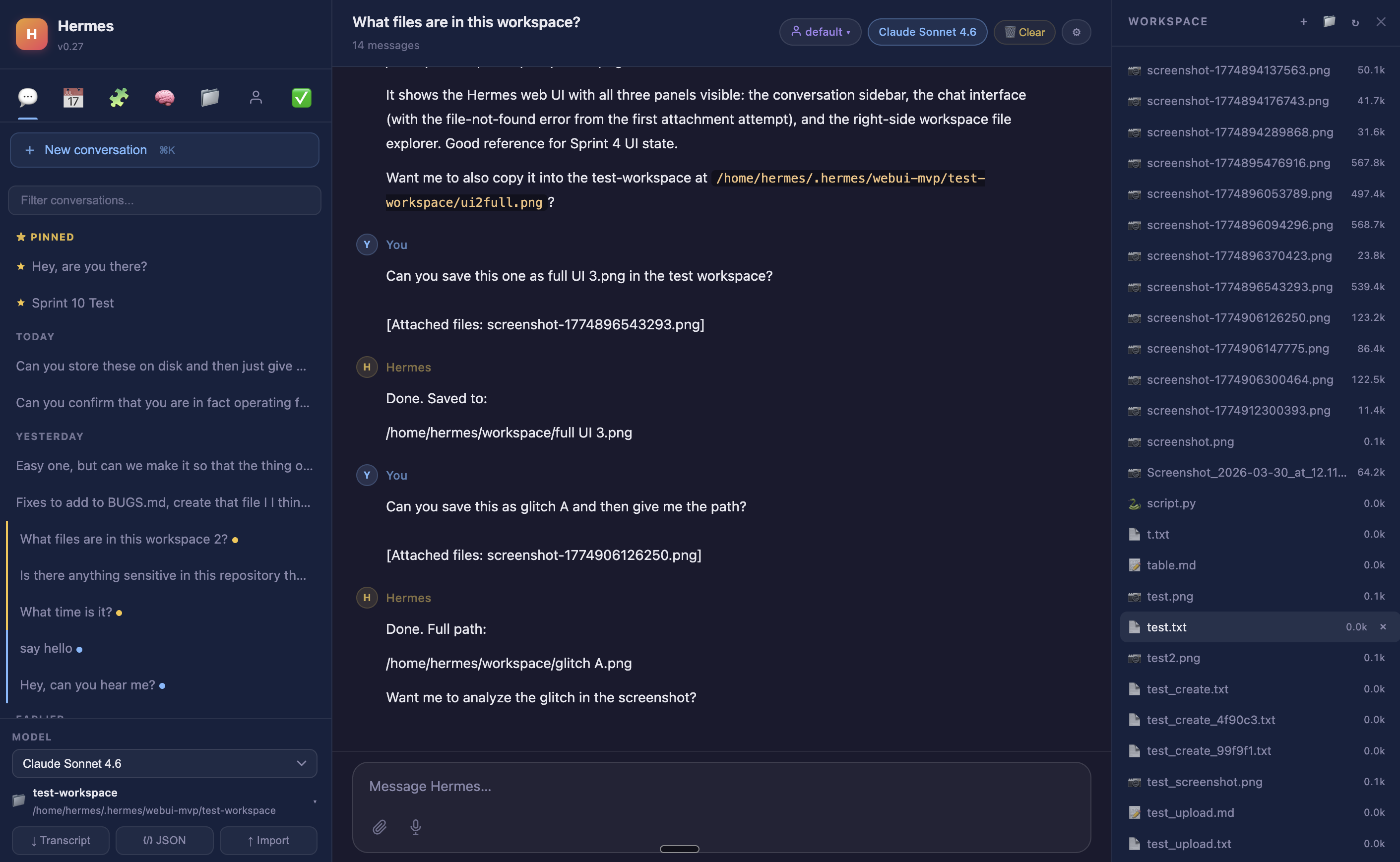
Workspace file browser with inline preview
|
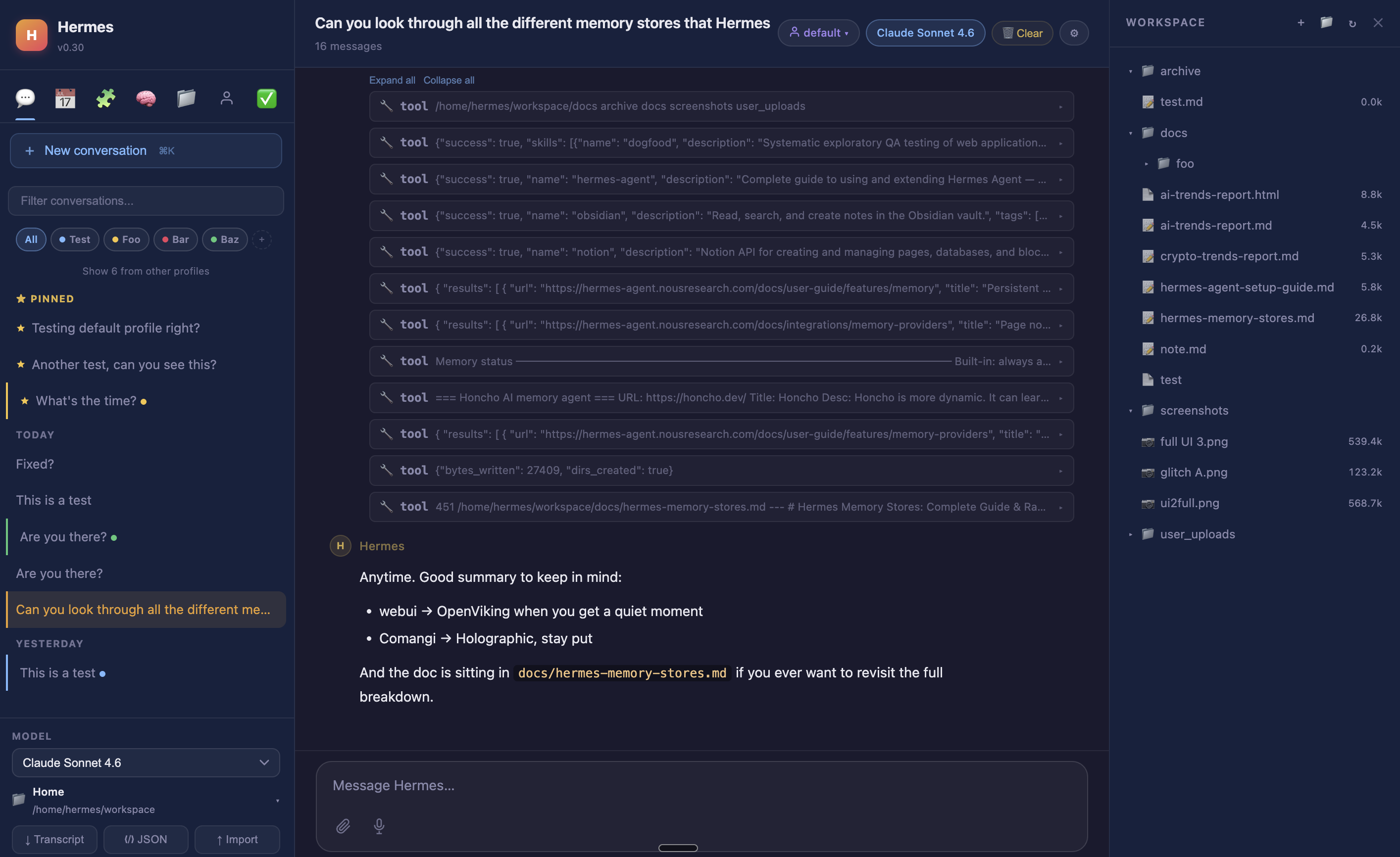
Session projects, tags, and tool call cards
|
This gives you nearly **1:1 parity with Hermes CLI from a convenient web UI** which you can access securely through an SSH tunnel from your Hermes setup. Single command to start this up, and a single command to SSH tunnel for access on your computer. Every single part of the web UI uses your existing Hermes agent and existing models, without requiring any additional setup.
---
## Why Hermes
Most AI tools reset every session. They don't know who you are, what you worked on, or what
conventions your project follows. You re-explain yourself every time.
Hermes retains context across sessions, runs scheduled jobs while you're offline, and gets
smarter about your environment the longer it runs. It uses your existing Hermes agent setup,
your existing models, and requires no additional configuration to start.
What makes it different from other agentic tools:
- **Persistent memory** — user profile, agent notes, and a skills system that saves reusable
procedures; Hermes learns your environment and does not have to relearn it
- **Self-hosted scheduling** — cron jobs that fire while you're offline and deliver results to
Telegram, Discord, Slack, Signal, email, and more
- **10+ messaging platforms** — the same agent available in the terminal is reachable from your phone
- **Self-improving skills** — Hermes writes and saves its own skills automatically from experience;
no marketplace to browse, no plugins to install
- **Provider-agnostic** — OpenAI, Anthropic, Google, DeepSeek, OpenRouter, and more
- **Orchestrates other agents** — can spawn Claude Code or Codex for heavy coding tasks and bring
the results back into its own memory
- **Self-hosted** — your conversations, your memory, your hardware
**vs. the field** *(landscape is actively shifting — see [HERMES.md](HERMES.md) for the full breakdown)*:
| | OpenClaw | Claude Code | Codex CLI | OpenCode | Hermes |
|---|---|---|---|---|---|
| Persistent memory (auto) | Yes | Partial† | Partial | Partial | Yes |
| Scheduled jobs (self-hosted) | Yes | No‡ | No | No | Yes |
| Messaging app access | Yes (15+ platforms) | Partial (Telegram/Discord preview) | No | No | Yes (10+) |
| Web UI (self-hosted) | Dashboard only | No | No | Yes | Yes |
| Self-improving skills | Partial | No | No | No | Yes |
| Python / ML ecosystem | No (Node.js) | No | No | No | Yes |
| Provider-agnostic | Yes | No (Claude only) | Yes | Yes | Yes |
| Open source | Yes (MIT) | No | Yes | Yes | Yes |
† Claude Code has CLAUDE.md / MEMORY.md project context and rolling auto-memory, but not full automatic cross-session recall
‡ Claude Code has cloud-managed scheduling (Anthropic infrastructure) and session-scoped `/loop`; no self-hosted cron
**The closest competitor is OpenClaw** — both are always-on, self-hosted, open-source agents
with memory, cron, and messaging. The key differences: Hermes writes and saves its own skills
automatically as a core behavior (OpenClaw's skill system centers on a community marketplace);
Hermes is more stable across updates (OpenClaw has documented release regressions and ClawHub
has had security incidents involving malicious skills); and Hermes runs natively in the Python
ecosystem. See [HERMES.md](HERMES.md) for the full side-by-side.
---
## Quick start
First, you need to install and configure [Hermes Agent](https://hermes-agent.nousresearch.com/docs/getting-started/quickstart) on your computer or server. This includes the following steps to complete:
* [ ] Running the `curl` command to download and setup Hermes
* [ ] Configure your [LLM provider](https://hermes-agent.nousresearch.com/docs/getting-started/quickstart#2-set-up-a-provider) with `hermes model`
* [ ] Configure yout [messaging gateways](https://hermes-agent.nousresearch.com/docs/user-guide/messaging/) with `hermes gateway setup`
* [ ] Can start chatting with hermes on command-line with `hermes`
* [ ] Optional: [Configure your extended memory provider](https://hermes-agent.nousresearch.com/docs/user-guide/features/memory-providers)
* [ ] Optional: [Configure your tools](https://hermes-agent.nousresearch.com/docs/user-guide/features/tools)
Once installed, you can now setup the web UI with:
```bash
git clone https://github.com/nesquena/hermes-webui.git hermes-webui
cd hermes-webui
./start.sh
```
That is it! The script will:
1. Locate your Hermes agent directory automatically.
2. Find (or create) a Python environment with the required dependencies.
3. Start the web server.
4. Print the URL (and SSH tunnel command if you are on a remote machine).
---
## Docker
**Pre-built images** (amd64 + arm64) are published to GHCR on every release:
Make sure the `HERMES_WEBUI_STATE_DIR` (by default `~/.hermes/webui-mvp`, as detailed in the `.env.example` file) folder exist with the UID/GID of the owner of the `.hermes` folder.
The container will also mount your configured "workspace" (also from the example .env.example) as `/workspace`. adapt the location as needed.
```bash
docker pull ghcr.io/nesquena/hermes-webui:latest
docker run -d \
-e WANTED_UID=`id -u` -e WANTED_GID=`id -g` \
-v ~/.hermes:/home/hermeswebui/.hermes -e HERMES_WEBUI_STATE_DIR=/home/hermeswebui/.hermes/webui-mvp \
-v ~/workspace:/workspace \
-p 8787:8787 ghcr.io/nesquena/hermes-webui:latest
```
Or run with Docker Compose (recommended):
```bash
# Check the docker-compose.yml and make sure to adapt as needed, at minimum WANTED_UID/WANTED_GID
docker compose up -d
```
Or build locally:
```bash
docker build -t hermes-webui .
docker run -d \
-e WANTED_UID=`id -u` -e WANTED_GID=`id -g` \
-v ~/.hermes:/home/hermeswebui/.hermes -e HERMES_WEBUI_STATE_DIR=/home/hermeswebui/.hermes/webui-mvp \
-v ~/workspace:/workspace \
-p 8787:8787 hermes-webui
```
Open http://localhost:8787 in your browser.
To enable password protection:
```bash
docker run -d \
-e WANTED_UID=`id -u` -e WANTED_GID=`id -g` \
-v ~/.hermes:/home/hermeswebui/.hermes -e HERMES_WEBUI_STATE_DIR=/home/hermeswebui/.hermes/webui-mvp \
-v ~/workspace:/workspace \
-p 8787:8787 -e HERMES_WEBUI_PASSWORD=your-secret ghcr.io/nesquena/hermes-webui:latest
```
> **Note:** By default, Docker Compose binds to `127.0.0.1` (localhost only).
> To expose on a network, change the port to `"8787:8787"` in `docker-compose.yml`
> and set `HERMES_WEBUI_PASSWORD` to enable authentication.
---
## What start.sh discovers automatically
| Thing | How it finds it |
|---|---|
| Hermes agent dir | `HERMES_WEBUI_AGENT_DIR` env, then `~/.hermes/hermes-agent`, then sibling `../hermes-agent` |
| Python executable | Agent venv first, then `.venv` in this repo, then system `python3` |
| State directory | `HERMES_WEBUI_STATE_DIR` env, then `~/.hermes/webui-mvp` |
| Default workspace | `HERMES_WEBUI_DEFAULT_WORKSPACE` env, then `~/workspace`, then state dir |
| Port | `HERMES_WEBUI_PORT` env or first argument, default `8787` |
If discovery finds everything, nothing else is required.
---
## Overrides (only needed if auto-detection misses)
```bash
export HERMES_WEBUI_AGENT_DIR=/path/to/hermes-agent
export HERMES_WEBUI_PYTHON=/path/to/python
export HERMES_WEBUI_PORT=9000
./start.sh
```
Or inline:
```bash
HERMES_WEBUI_AGENT_DIR=/custom/path ./start.sh 9000
```
Full list of environment variables:
| Variable | Default | Description |
|---|---|---|
| `HERMES_WEBUI_AGENT_DIR` | auto-discovered | Path to the hermes-agent checkout |
| `HERMES_WEBUI_PYTHON` | auto-discovered | Python executable |
| `HERMES_WEBUI_HOST` | `127.0.0.1` | Bind address |
| `HERMES_WEBUI_PORT` | `8787` | Port |
| `HERMES_WEBUI_STATE_DIR` | `~/.hermes/webui-mvp` | Where sessions and state are stored |
| `HERMES_WEBUI_DEFAULT_WORKSPACE` | `~/workspace` | Default workspace |
| `HERMES_WEBUI_DEFAULT_MODEL` | `openai/gpt-5.4-mini` | Default model |
| `HERMES_WEBUI_PASSWORD` | *(unset)* | Set to enable password authentication |
| `HERMES_HOME` | `~/.hermes` | Base directory for Hermes state (affects all paths) |
| `HERMES_CONFIG_PATH` | `~/.hermes/config.yaml` | Path to Hermes config file |
---
## Accessing from a remote machine
The server binds to `127.0.0.1` by default (loopback only). If you are running
Hermes on a VPS or remote server, use an SSH tunnel from your local machine:
```bash
ssh -N -L :127.0.0.1: @
```
Example:
```bash
ssh -N -L 8787:127.0.0.1:8787 user@your.server.com
```
Then open `http://localhost:8787` in your local browser.
`start.sh` will print this command for you automatically when it detects you
are running over SSH.
---
## Accessing on your phone with Tailscale
[Tailscale](https://tailscale.com) is a zero-config mesh VPN built on
WireGuard. Install it on your server and your phone, and they join the same
private network -- no port forwarding, no SSH tunnels, no public exposure.
The Hermes Web UI is fully responsive with a mobile-optimized layout
(hamburger sidebar, bottom navigation bar, touch-friendly controls), so it
works well as a daily-driver agent interface from your phone.
**Setup:**
1. Install [Tailscale](https://tailscale.com/download) on your server and
your iPhone/Android.
2. Start the WebUI listening on all interfaces with password auth enabled:
```bash
HERMES_WEBUI_HOST=0.0.0.0 HERMES_WEBUI_PASSWORD=your-secret ./start.sh
```
3. Open `http://:8787` in your phone's browser
(find your server's Tailscale IP in the Tailscale app or with
`tailscale ip -4` on the server).
That's it. Traffic is encrypted end-to-end by WireGuard, and password auth
protects the UI at the application level. You can add it to your home screen
for an app-like experience.
> **Tip:** If using Docker, set `HERMES_WEBUI_HOST=0.0.0.0` in your
> `docker-compose.yml` environment (already the default) and set
> `HERMES_WEBUI_PASSWORD`.
---
## Manual launch (without start.sh)
If you prefer to launch the server directly:
```bash
cd /path/to/hermes-agent # or wherever sys.path can find Hermes modules
HERMES_WEBUI_PORT=8787 venv/bin/python /path/to/hermes-webui/server.py
```
Note: use the agent venv Python (or any Python environment that has the Hermes agent dependencies installed). System Python will be missing `openai`, `httpx`, and other required packages.
Health check:
```bash
curl http://127.0.0.1:8787/health
```
---
## Running tests
Tests discover the repo and the Hermes agent dynamically -- no hardcoded paths.
```bash
cd hermes-webui
pytest tests/ -v --timeout=60
```
Or using the agent venv explicitly:
```bash
/path/to/hermes-agent/venv/bin/python -m pytest tests/ -v
```
Tests run against an isolated server on port 8788 with a separate state directory.
Production data and real cron jobs are never touched. Current count: **433 tests**
across 23 test files.
---
## Features
### Chat and agent
- Streaming responses via SSE (tokens appear as they are generated)
- Multi-provider model support -- any Hermes API provider (OpenAI, Anthropic, Google, DeepSeek, Nous Portal, OpenRouter, MiniMax, Z.AI); dynamic model dropdown populated from configured keys
- Send a message while one is processing -- it queues automatically
- Edit any past user message inline and regenerate from that point
- Retry the last assistant response with one click
- Cancel a running task from the activity bar
- Tool call cards inline -- each shows the tool name, args, and result snippet; expand/collapse all toggle for multi-tool turns
- Subagent delegation cards -- child agent activity shown with distinct icon and indented border
- Mermaid diagram rendering inline (flowcharts, sequence diagrams, gantt charts)
- Thinking/reasoning display -- collapsible gold-themed cards for Claude extended thinking and o3 reasoning blocks
- Approval card for dangerous shell commands (allow once / session / always / deny)
- SSE auto-reconnect on network blips (SSH tunnel resilience)
- File attachments persist across page reloads
- Message timestamps (HH:MM next to each message, full date on hover)
- Code block copy button with "Copied!" feedback
- Syntax highlighting via Prism.js (Python, JS, bash, JSON, SQL, and more)
- Safe HTML rendering in AI responses (bold, italic, code converted to markdown)
- rAF-throttled token streaming for smoother rendering during long responses
- Context usage indicator in composer footer -- token count, cost, and fill bar (model-aware)
### Sessions
- Create, rename, duplicate, delete, search by title and message content
- Pin/star sessions to the top of the sidebar (gold indicator)
- Archive sessions (hide without deleting, toggle to show)
- Session projects -- named groups with colors for organizing sessions
- Session tags -- add #tag to titles for colored chips and click-to-filter
- Grouped by Today / Yesterday / Earlier in the sidebar (collapsible date groups)
- Download as Markdown transcript, full JSON export, or import from JSON
- Sessions persist across page reloads and SSH tunnel reconnects
- Browser tab title reflects the active session name
- CLI session bridge -- CLI sessions from hermes-agent's SQLite store appear in the sidebar with a gold "cli" badge; click to import with full history and reply normally
- Token/cost display -- input tokens, output tokens, estimated cost shown per conversation (toggle in Settings or `/usage` command)
### Workspace file browser
- Directory tree with expand/collapse (single-click toggles, double-click navigates)
- Breadcrumb navigation with clickable path segments
- Preview text, code, Markdown (rendered), and images inline
- Edit, create, delete, and rename files; create folders
- Binary file download (auto-detected from server)
- File preview auto-closes on directory navigation (with unsaved-edit guard)
- Git detection -- branch name and dirty file count badge in workspace header
- Right panel is drag-resizable
- Syntax highlighted code preview (Prism.js)
### Voice input
- Microphone button in the composer (Web Speech API)
- Tap to record, tap again or send to stop
- Live interim transcription appears in the textarea
- Auto-stops after ~2s of silence
- Appends to existing textarea content (doesn't replace)
- Hidden when browser doesn't support Web Speech API (Chrome, Edge, Safari)
### Profiles
- Profile picker in the topbar -- purple chip with dropdown showing all profiles
- Gateway status dots (green = running), model info, skill count per profile
- Profiles management panel -- create, switch, and delete profiles from the sidebar
- Clone config from active profile on create
- Optional custom endpoint fields on create -- Base URL and API key written into the profile's `config.yaml` at creation time, so Ollama, LMStudio, and other local endpoints can be configured without editing files manually
- Seamless switching -- no server restart; reloads config, skills, memory, cron, models
- Per-session profile tracking (records which profile was active at creation)
### Authentication and security
- Optional password auth -- off by default, zero friction for localhost
- Enable via `HERMES_WEBUI_PASSWORD` env var or Settings panel
- Signed HMAC HTTP-only cookie with 24h TTL
- Minimal dark-themed login page at `/login`
- Security headers on all responses (X-Content-Type-Options, X-Frame-Options, Referrer-Policy)
- 20MB POST body size limit
- CDN resources pinned with SRI integrity hashes
### Themes
- 6 built-in themes: Dark (default), Light, Slate, Solarized Dark, Monokai, Nord
- Switch via Settings panel dropdown (instant live preview) or `/theme` command
- Persists across reloads (server-side in settings.json + localStorage for flicker-free loading)
- Custom themes: define a `:root[data-theme="name"]` CSS block and it works — see [THEMES.md](THEMES.md)
### Settings and configuration
- Settings panel (gear icon) -- default model, default workspace, send key, theme
- Send key: Enter (default) or Ctrl/Cmd+Enter
- Show/hide CLI sessions toggle (enabled by default)
- Token usage display toggle (off by default, also via `/usage` command)
- Unsaved changes guard -- discard/save prompt when closing with unpersisted changes
- Cron completion alerts -- toast notifications and unread badge on Tasks tab
- Background agent error alerts -- banner when a non-active session encounters an error
### Slash commands
- Type `/` in the composer for autocomplete dropdown
- Built-in: `/help`, `/clear`, `/model `, `/workspace `, `/new`, `/usage`, `/theme`, `/compact`
- Arrow keys navigate, Tab/Enter select, Escape closes
- Unrecognized commands pass through to the agent
### Panels
- **Chat** -- session list, search, pin, archive, projects, new conversation
- **Tasks** -- view, create, edit, run, pause/resume, delete cron jobs; run history; completion alerts
- **Skills** -- list all skills by category, search, preview, create/edit/delete; linked files viewer
- **Memory** -- view and edit MEMORY.md and USER.md inline
- **Profiles** -- create, switch, delete agent profiles; clone config
- **Todos** -- live task list from the current session
- **Spaces** -- add, rename, remove workspaces; quick-switch from topbar
### Mobile responsive
- Hamburger sidebar -- slide-in overlay on mobile (<640px)
- Bottom navigation bar -- 5-tab iOS-style fixed bar
- Files slide-over panel from right edge
- Touch targets minimum 44px on all interactive elements
- Composer positioned above bottom nav
- Desktop layout completely unchanged
---
## Architecture
```
server.py HTTP routing shell + auth middleware (~83 lines)
api/
auth.py Optional password authentication, signed cookies (~149 lines)
config.py Discovery, globals, model detection, reloadable config (~726 lines)
helpers.py HTTP helpers, security headers (~71 lines)
models.py Session model + CRUD + CLI bridge (~338 lines)
profiles.py Profile state management, hermes_cli wrapper (~366 lines)
routes.py All GET + POST route handlers (~1314 lines)
streaming.py SSE engine, run_agent, cancel support (~332 lines)
upload.py Multipart parser, file upload handler (~78 lines)
workspace.py File ops, workspace helpers, git detection (~288 lines)
static/
index.html HTML template (~388 lines)
style.css All CSS incl. mobile responsive (~726 lines)
ui.js DOM helpers, renderMd, tool cards, context indicator (~1063 lines)
workspace.js File preview, file ops, git badge (~247 lines)
sessions.js Session CRUD, collapsible groups, search (~589 lines)
messages.js send(), SSE handlers, rAF throttle (~352 lines)
panels.js Cron, skills, memory, profiles, settings (~1146 lines)
commands.js Slash command autocomplete (~170 lines)
boot.js Mobile nav, voice input, boot IIFE (~338 lines)
tests/
conftest.py Isolated test server (port 8788)
test_sprint{1-23}.py 22 test files, 426 test functions
test_regressions.py Permanent regression gate (23 tests)
Dockerfile python:3.12-slim container image
docker-compose.yml Compose with named volume and optional auth
.github/workflows/ CI: multi-arch Docker build + GitHub Release on tag
```
State lives outside the repo at `~/.hermes/webui-mvp/` by default
(sessions, workspaces, settings, projects, last_workspace). Override with `HERMES_WEBUI_STATE_DIR`.
---
## Docs
- `HERMES.md` -- why Hermes, mental model, and detailed comparison to Claude Code / Codex / OpenCode / Cursor
- `ROADMAP.md` -- feature roadmap and sprint history
- `ARCHITECTURE.md` -- system design, all API endpoints, implementation notes
- `TESTING.md` -- manual browser test plan and automated coverage reference
- `CHANGELOG.md` -- release notes per sprint
- `SPRINTS.md` -- forward sprint plan with CLI + Claude parity targets
- `THEMES.md` -- theme system documentation, custom theme guide
## Repo
```
git@github.com:nesquena/hermes-webui.git
```